Featured Post

Callan and Grant’s Bohemian Fall Mountain Wedding in Georgia by Jessi Casara Photography
I have the most gorgeous autumn wedding for you today, filled with the most stunning...


I have the most gorgeous autumn wedding for you today, filled with the most stunning...
26
Sep
2025

By Boho
Three months after my friend’s wedding, she was still texting people asking for photos. The usual story – “Hey, do you still have those pics from the ceremony?” followed by promises to “send them soon” that never happen.
It was frustrating to watch because I knew people had taken great photos. Her cousin got candid shots during getting ready. Someone captured her dog joining the processional (uninvited). There were genuine moments during dinner that the photographer missed.
But despite all these phones capturing memories, she ended up with maybe 40 photos from 90 guests. The rest disappeared into camera rolls.
This happens to basically every couple, and it got me thinking about why our photo-sharing systems suck so much. We plan these meaningful celebrations, then lose most of the memories because asking people for photos feels awkward and people forget.
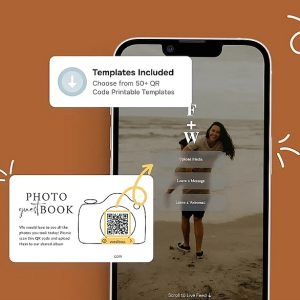
That’s the problem I set out to solve when I built Wedding Studio – creating shared wedding album QR codes that actually work instead of adding to the post-wedding stress.

Let’s be honest about why the usual approaches don’t work:
Instagram hashtags turn your wedding into a performance. People curate posts for likes instead of sharing real moments. Plus, half your family doesn’t even use hashtags properly.
Disposable cameras seemed like a good vintage idea until you spend $200 developing mostly blurry photos of people’s thumbs.
“Just text me your photos” creates months of awkward follow-ups that kill your post-wedding happiness.
Group chats become chaotic messes where photos get buried under 200 other messages.
The real problem? All these methods put the burden on your guests to remember and follow through later. And people are busy, forgetful, and honestly don’t want to sort through 500 photos to find the good ones.
Here’s the simple version: guests scan a QR code with their phone and instantly upload photos to your shared album. No apps, no accounts, no “I’ll do it later.”
The magic happens when you see your day through everyone’s eyes. Your photographer got the pretty shots, but your guests caught the real stuff:
Real example: Emma and Jake used this for their backyard wedding last summer. Instead of the typical 20-30 guest photos couples get, they collected 340 photos and videos from 75 people. Including some hilarious behind-the-scenes stuff they never would have seen otherwise.
“My brother-in-law got video of my dad practicing his speech in the bathroom mirror,” Emma told me. “That’s going to be more valuable than our professional highlight reel in 20 years.”

The biggest challenge is making QR codes feel natural instead of like a tech conference.
Wedding Studio makes customization easy – you can create codes in any color, add borders, and make them actually look good with your wedding aesthetic instead of screaming “corporate event.”
Every wedding has them – the relatives who still print MapQuest directions and your friend who refuses to get Instagram.
Here’s the thing: shared wedding album QR codes are actually more accessible than most alternatives because they work with any smartphone camera. No special apps needed.
But some people still need help:
Designate Tech Helpers: Ask a few younger family members to gently assist anyone struggling. Make it feel like family helping family.
Keep Instructions Simple: Create one-page guides with big text and pictures. “Point camera at square, tap the link that appears, select photos, tap upload.”
Have Backup Plans: Someone can help take photos with hesitant guests, or you can collect photos manually from people who just aren’t comfortable.
Don’t Stress About 100% Participation: If you get photos from 60-70% of guests instead of the usual 15%, you’re winning.

After helping hundreds of couples set up QR code wedding albums, clear patterns emerged:
Result: 280 photos from 85 guests, including shots of the kitchen staff celebrating when they thought no one was looking.
Step 1: Choose Your Platform Wedding Studio works well because it allows customization and doesn’t require guests to create accounts. Plus it handles traffic spikes when everyone tries to upload at once.
Step 2: Keep Album Structure Simple
Step 3: Design Codes That Match Your Style Use your wedding colours, add simple borders, print on nice materials. Make them look intentional, not like an afterthought.
Step 4: Plan Strategic Placement Put codes where people naturally look: table settings, bathroom areas, bar signs, guest book table.
Step 5: Brief Your Wedding Party Make sure a few key people understand how it works and can help explain it to others.
Step 6: Mention It During the Event Have someone briefly explain during speeches or announcements. “We’d love your photos – just use the codes at your tables to add them to our albums.”
Look, you’re going to spend thousands on photography to capture your wedding day. But your professional photos, as beautiful as they are, only tell part of the story.
Your guests capture the stuff that happens between the poses, the genuine reactions, the moments that make you laugh years later. Shared wedding album QR codes just make sure you actually get to see those moments instead of wondering what you missed.
The couples who use this approach consistently tell me the same thing: seeing their wedding through their friends’ and family’s eyes felt like getting to experience the day all over again.
Your wedding deserves better than the usual photo collection disaster. The technology exists to fix this – you just need to use it smartly.
www.wedding.studio / INSTAGRAM


This site uses Akismet to reduce spam. Learn how your comment data is processed.


Comments